Hierarchy Add-on
The GetRiskManager Hierarchy Add-on is a flexible risk architecture tool that allows businesses to map, track, and categorise risks across multiple organisational levels. By structuring risks vertically and horizontally, teams gain clear visibility into how project, department, or client-level risks affect the broader organisation.
Focus your risks against your organisation, projects, or clients with just a few simple clicks.
Using the GetRiskManager Hierarchy Add-on, available in the App, the standard setup is designed to align with how your organisation operates.
The hierarchy is unlimited horizontally and vertically, and you can set it up to align with your objectives and situation.
Key Capabilities of the Hierarchy Add-on
Unlimited Scaling: Expand your risk tracking horizontally or vertically without structural limits
Multi-Framework Alignment: Tailor your setup to match departments, active projects, or individual client accounts
Targeted Risk Focus: Filter and isolate risks with a few clicks to see exactly what matters to a specific team
How Does the Standard GetRiskManager Hierarchy Work?
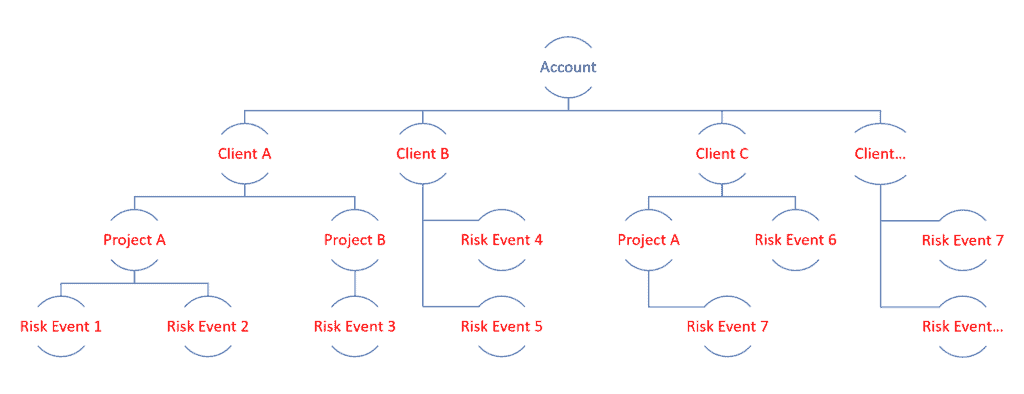
The GetRiskManager standard set-up is shown below. All risks are directly attributed to the Account.

Using the GetRiskManager Hierarchy Add-on, available in the App, the standard setup is designed to align with how your organisation operates.
The hierarchy is unlimited horizontally and vertically, and you can set it up to align with your objectives and situation.
Using Risk Hierarchies for Organisational Management

Using Risk Hierarchies for Project Management

Using Risk Hierarchies - Clients Example
Frequently Asked Questions
What is a risk hierarchy?
A risk hierarchy is a structured framework that allows an organisation to map and categorise risks across different levels of its operations, such as by company, department, project, or client. It helps teams understand how isolated risks impact the broader organisation.
Is there a limit to how many levels I can add to the hierarchy?
No. The GetRiskManager Hierarchy Add-on features unlimited vertical and horizontal scaling, meaning you can build as many sub-departments, nested projects, or client tiers as your business model requires.
Can I customise the hierarchy to match my specific company structure?
Yes. The setup is entirely flexible and designed to align with how your organisation operates. You can choose to group risks by internal departments, active project streams, external client accounts, or a hybrid of these models.
How do users assign a risk to a specific level in the hierarchy?
Risks can be focused and aligned to your chosen organisational tier with a few simple clicks in the GetRiskManager App, ensuring accurate data filtering and reporting.
Does the standard setup include multiple hierarchy tiers?
By default, the standard setup attributes all risks directly to a single main Account. To unlock the ability to break risks down into departments, projects, or clients, you can activate the Hierarchy Add-on.